From order to invoice in one system
VYS TMS is built specifically for the small haulage company and for mid-sized transport firms: with self-employed drivers, or where the planner is often behind the wheel too and has to plan and adjust on the road. A TMS with its own on-board computer app, running on a separate tablet in the cab or simply on the driver's phone. Plan live in the browser and in the app, let drivers have consignment notes signed or scan them, let customers enter their own orders through their portal if you want that, and invoice automatically on what was actually driven.
- The only TMS that lets you plan from the mobile app and from the browser on your PC
- Schedule orders on a day or for a whole week, as a filler run
- Digital and scanned consignment notes
- Optional: customers enter their own orders
- Its own on-board computer app: on a tablet in the cab or on the driver's phone, for Apple and Android
- Invoicing with an accounting link
- Custom work possible in all kinds of areas
- Built from day-to-day haulage practice
Made for the small and mid-sized haulage company
VYS TMS is aimed specifically at the small haulage company and at mid-sized transport firms. Companies that work with self-employed drivers, and companies where the planner is often behind the wheel as well and therefore has to plan and adjust on the road. That is why VYS TMS is the only TMS that also lets you plan from the app: not only at the office, but just as well on the road.
Is the planner sometimes on the truck too?
Then you simply keep planning in the app while you are out: create orders, assign them to a run and move stops. You do not have to, but you always can. What you change on the road is with your drivers and at the office straight away.
Self-employed drivers
Give drivers the super driver role: they pick up orders from the order pool themselves, create new orders and put their stops in their own order.
Small team, no fuss
The office works in the browser without installing anything, drivers use the app for Apple (iPhone) and Android, and if you want, customers enter their orders themselves through the portal. Logging in is done with a code by email, without passwords.
Built by people who know haulage from the inside
VYS TMS was not thought up behind a desk. It was built from practice, by experienced developers who come from the haulage world themselves and know how things really work. That a load is not always unloaded on the same day it was loaded, that a driver on the road has no time to make phone calls, and that the planner is sometimes behind the wheel himself. That is why VYS TMS contains exactly what drivers, planners and managers need.
What drivers need
Their runs stop by stop, navigation with their own app, arrival that is registered automatically and loading and unloading with one tap. They make changes themselves in the app instead of calling, and set the text as large as they like.
What planners need
A live planning board where you drag instead of type, loading and unloading on different days, subcontractors that run along just like your own drivers, and planning from the app when you are on the truck yourself. What you change is with the driver straight away.
What managers need
Invoicing on what was actually driven, hours ready for payroll, consignment notes that reach the customer by themselves and a live view of where the trucks are. Less admin, less chasing and no separate lists.
Office, driver and customer work in the same system
No separate lists, no retyping. What the planner changes is in the app straight away, what the driver records is at the office straight away, and the customer follows his shipments in the portal.
Office
Orders, live planning board, rates, daily invoicing, collective invoices, payroll hours, fleet and reporting. All in the browser, with several planners at the same time.
Driver
The app for Apple (iPhone) and Android: runs and stops, navigation, automatic arrival registration, loading and unloading, signing or scanning consignment notes, day sheet, overnight stays and messages with the planning office.
Customer
Optionally the freight portal: customers can create and submit their own orders, which arrive straight in your planning, follow their status and download consignment notes and invoices. It is not compulsory: you can enter everything yourself as well.
Enter it once, after that it carries on by itself
Order
The planner enters it, a driver with the right permissions creates it in the app, or, if you offer that, the customer submits it himself through the freight portal.
Planning
Drag on the planning board or in the app. The driver and fellow planners see the change immediately.
Execution
The app registers the arrival automatically. The driver reports loading, unloading and waiting time, has the consignment note signed or scans it, and makes changes himself.
Invoice
Rates work out the run, the day is completed and the collective invoice goes out by email and to the bookkeeping.
Entering orders the way haulage really works
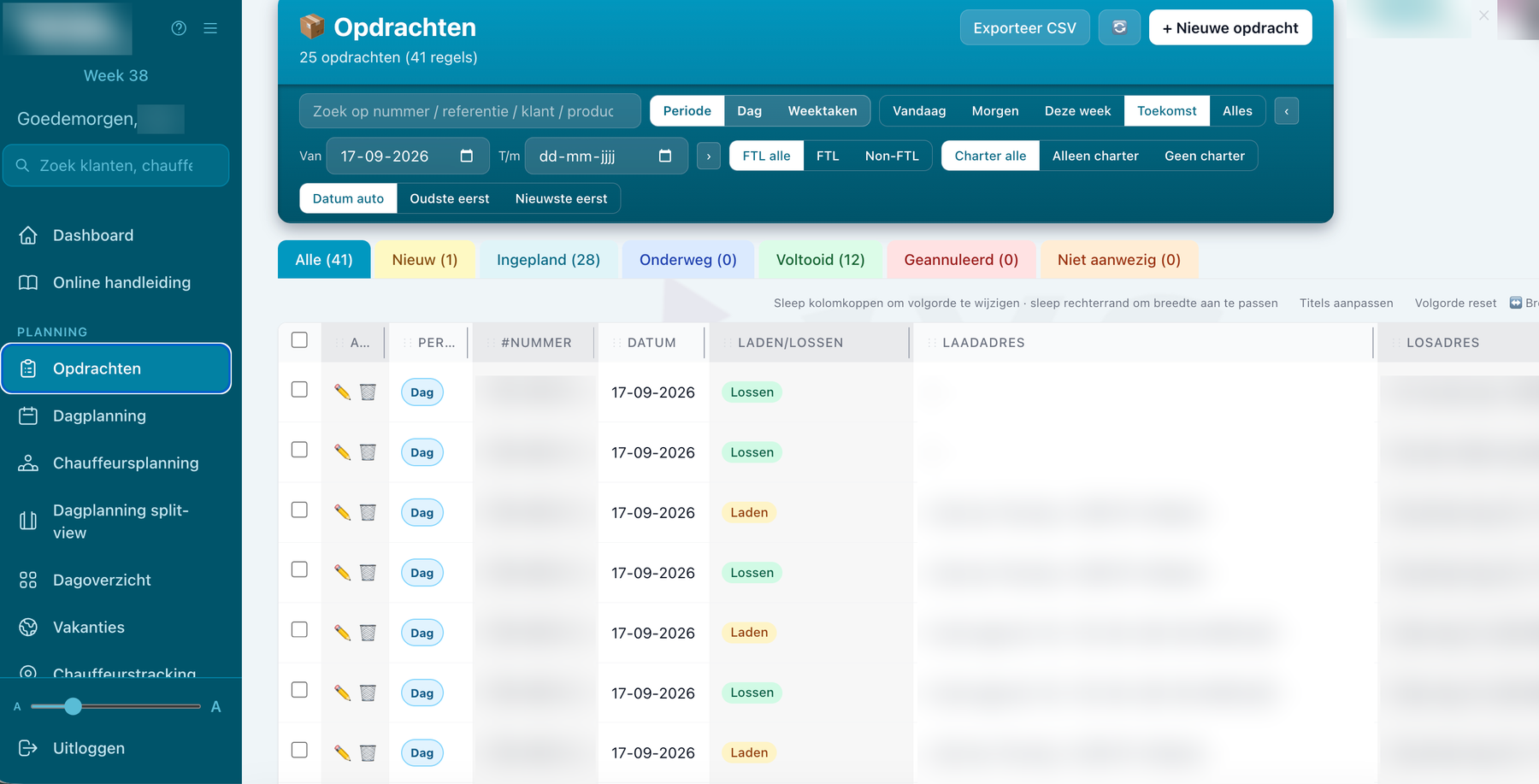
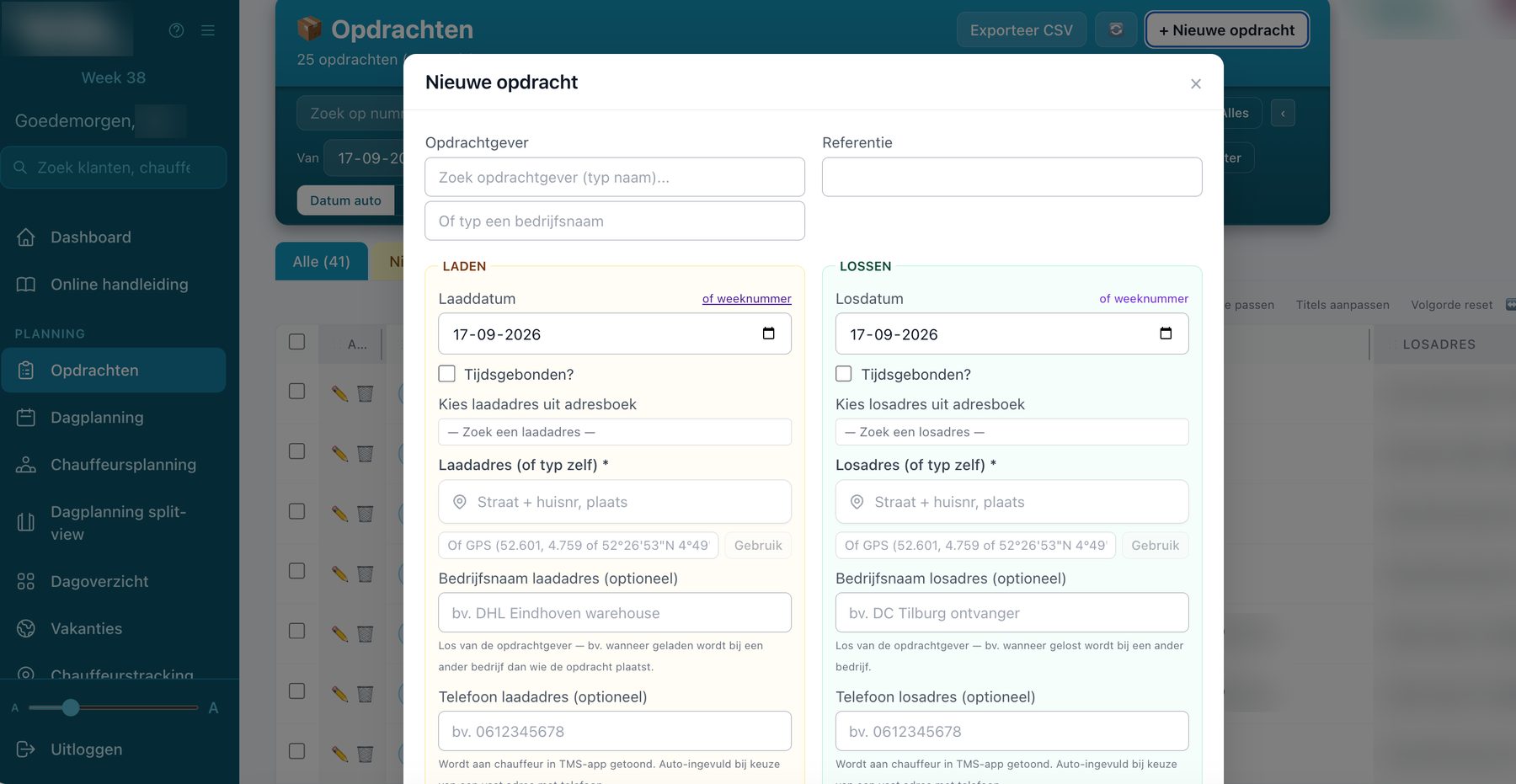
An order consists of a loading block and an unloading block, each with its own date and time. Loading and unloading on different days, or only a week number where the planner picks the day later, for example as a filler run: it is all possible.
- Loading and unloading addresses from the address book or entered freely, with company name, contact person, phone number and instructions for the driver.
- Several load lines per order with transport unit, product, quantity and weight, and a tick box for a full load.
- Per day or per week: schedule an order on a fixed day, or put it on a week number as a filler run that the planner uses wherever there is room that week.
- Subcontracted work, references and notes.
- Follow-up orders: the unloading address becomes the next loading address, and together they end up on one invoice.
- Copying to a new order or straight away on a second date as well.
- Origin visible: entered by the planner, through the freight portal or from the driver app.
- Protected: an order that has been loaded, unloaded or invoiced can no longer be deleted by accident.
Planning at the office or on the road, at the same time and live
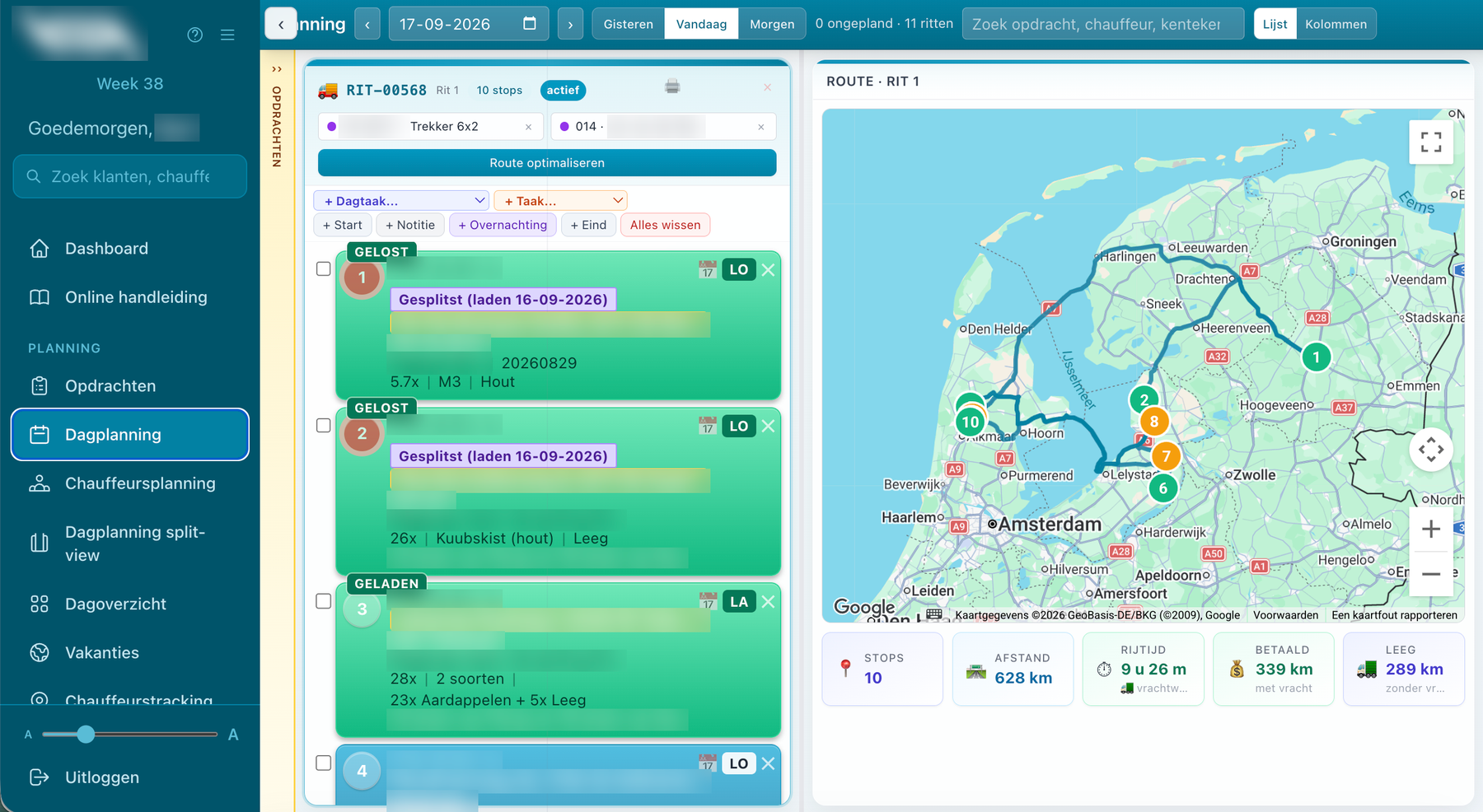
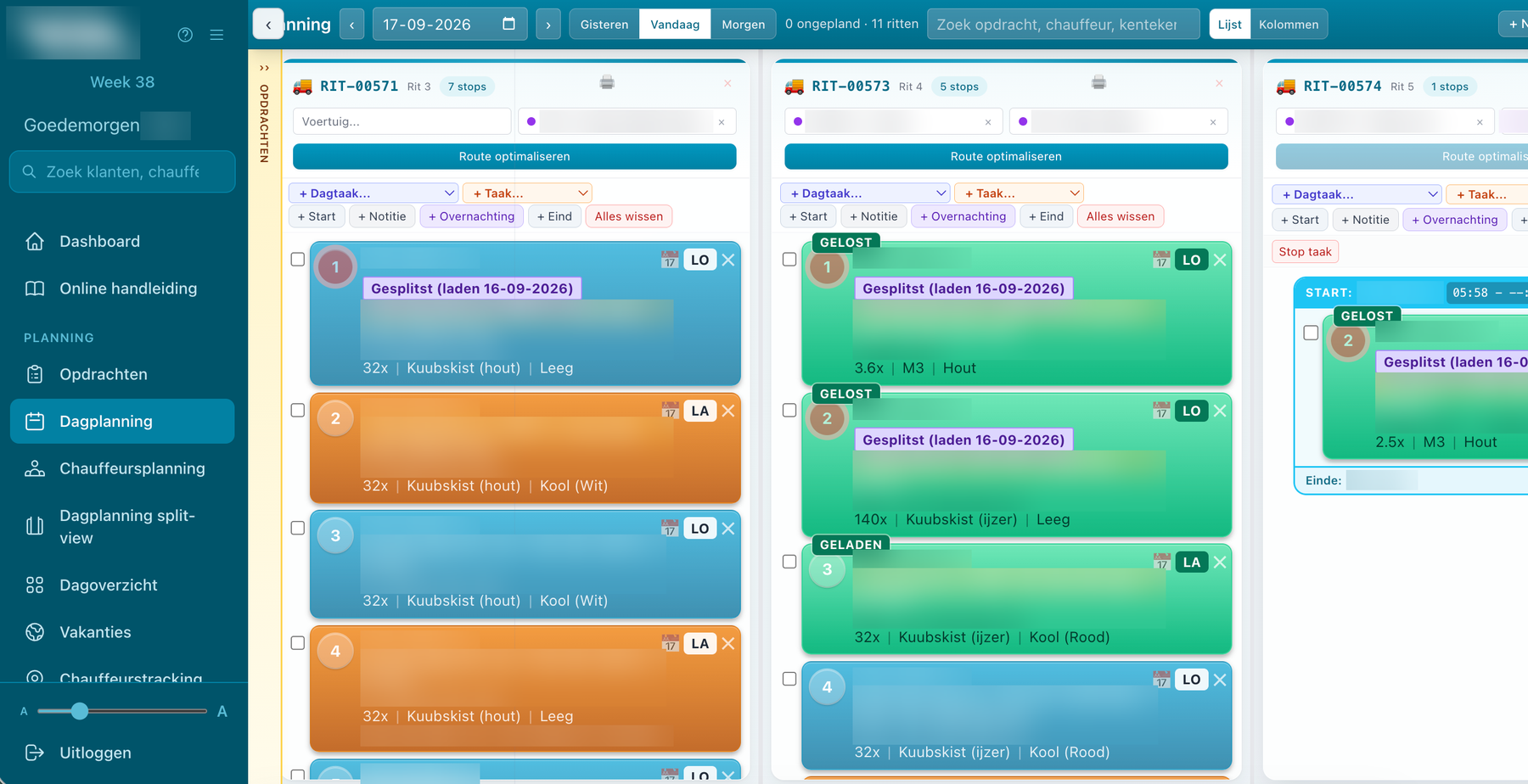
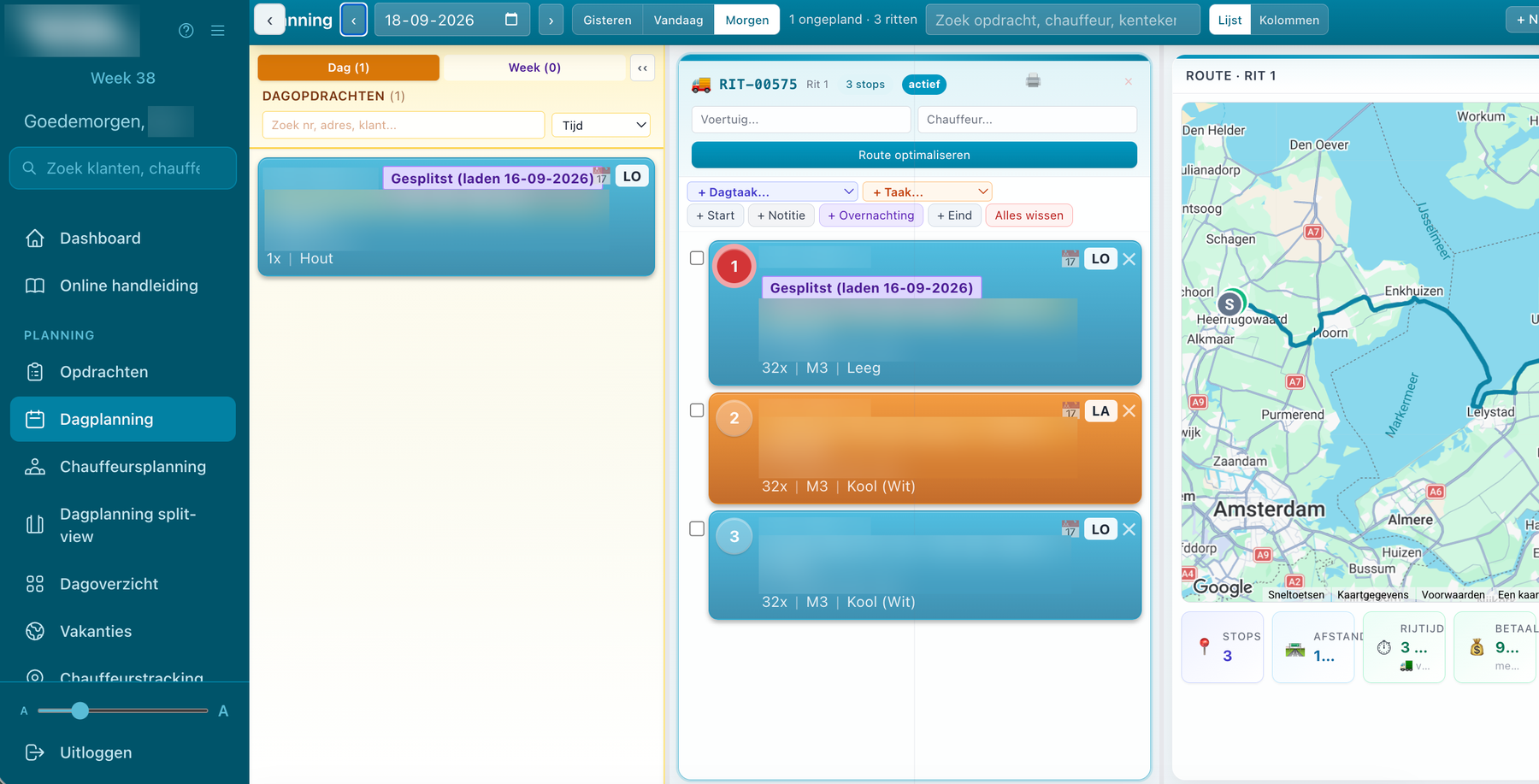
The planning board shows all runs of the day with a pool of orders that are not scheduled yet. Drag a loading or unloading block into a run and everyone sees it immediately: fellow planners in the browser and the driver in the app. If you are on the truck yourself, you plan and adjust from the app. VYS TMS is the only TMS where that is possible.
- Dragging from the pool into a run, within a run and between runs, as a list or in columns.
- Vehicle and driver chosen per run, with a direct view of who is free, already assigned or in maintenance.
- Holiday planning and maintenance planning: put drivers on holiday for a period and trucks in maintenance, and see in a chart per day ahead how many drivers and trucks are available.
- Subcontractors run along as usual: you put a subcontractor on a run just as easily as your own drivers. With the app he sees his runs and stops, reports loading and unloading and has the consignment note signed, and you follow everything live.
- Day tasks, planning tasks, overnight stays and notes as separate blocks in the run, plus start and end at the home base.
- Route optimisation from the home base, with loading always before unloading, and a map with kilometres and driving time according to a truck profile.
- Warning when loading and unloading are not scheduled together.
- Planning from the app, as the only TMS, for planners on the road: order pool, assigning, dragging blocks, opening runs and creating orders.
- Looking along as the driver: with one press you log into the app as a planner in the account of one of your drivers. You see exactly what he sees and help him remotely, and with Back to admin you are a planner again.
- Day overview and driver planning per truck or per driver, and a planning watchdog that emails you when orders are still open.
- Print the run order or save it as a PDF.
Planning from the app
The same planning, on your phone on the road: all runs of the day, the order pool, choosing vehicle and driver per run and dragging stops, and looking along as a driver with one press.
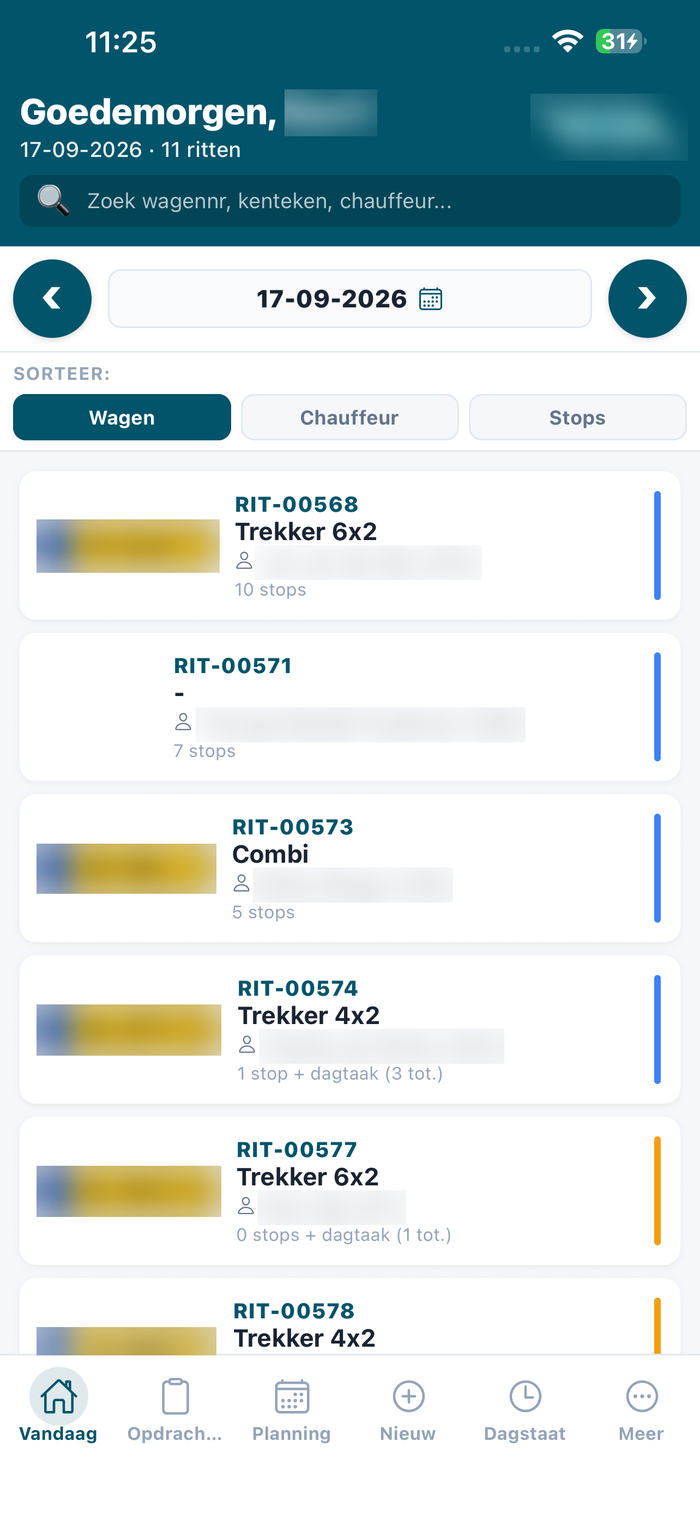
All runs of the day
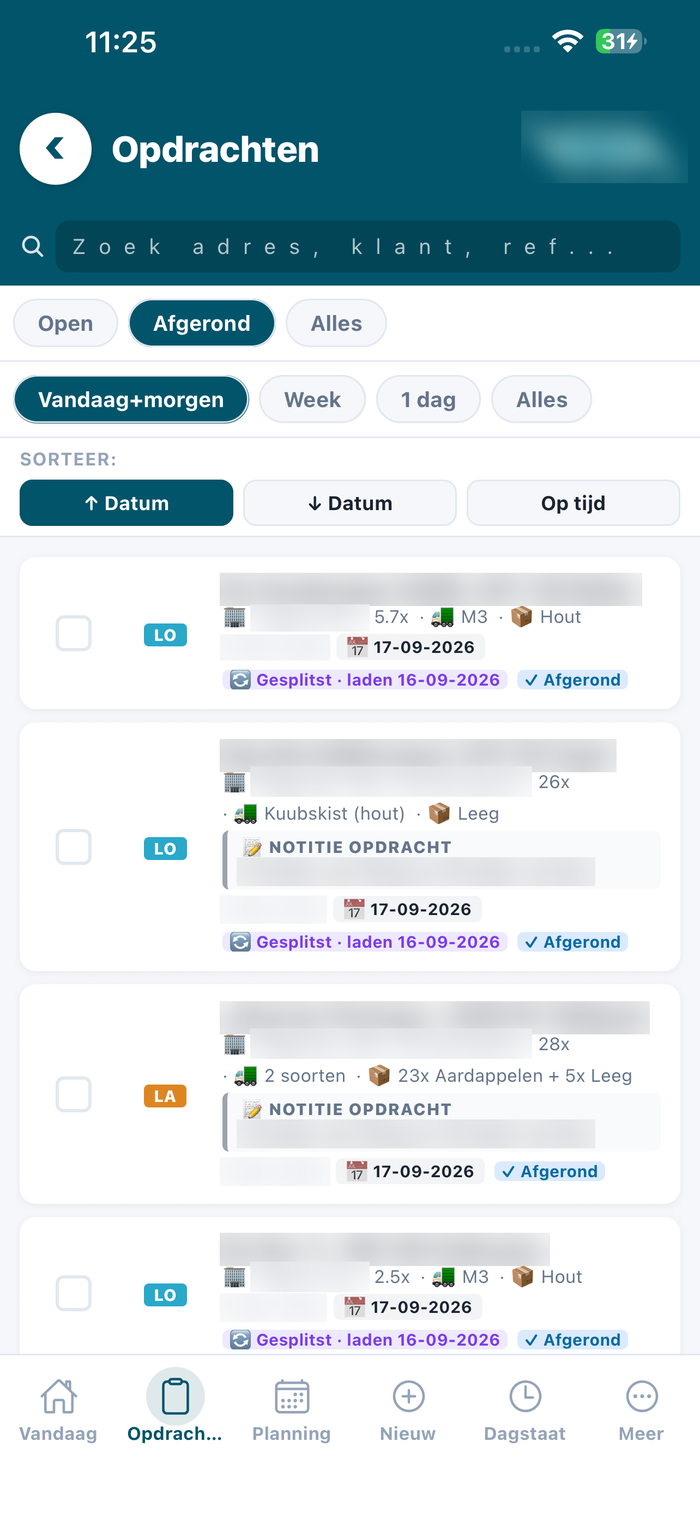
The order pool
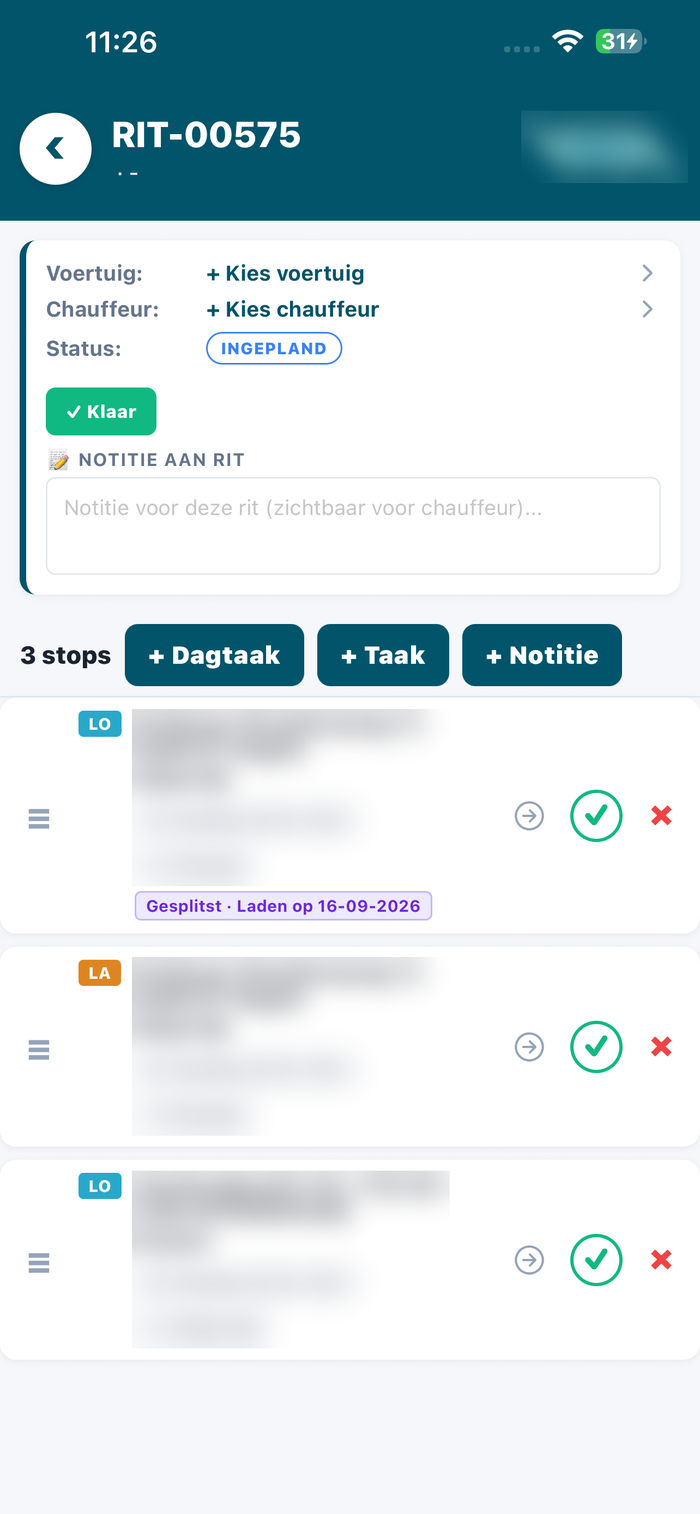
Choosing vehicle and driver, dragging stops
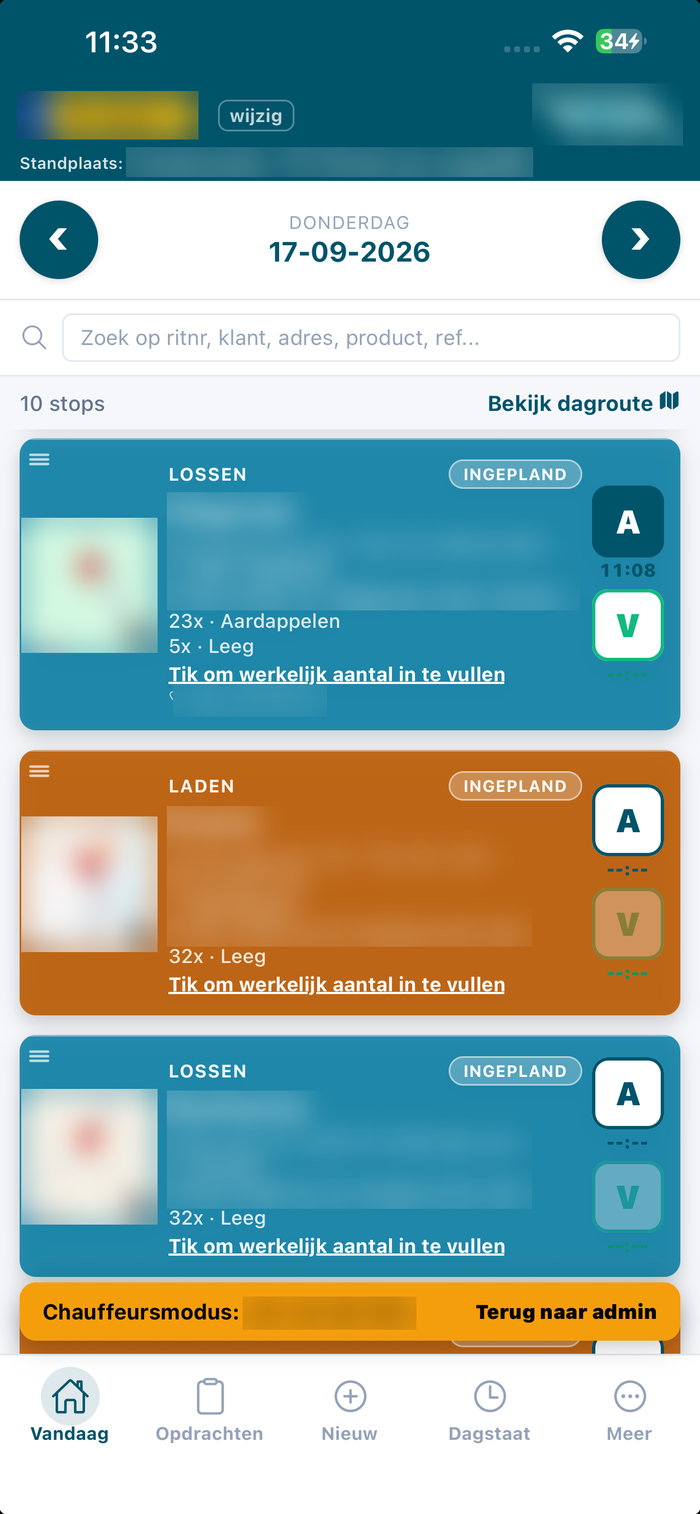
Looking along as the driver
Your own on-board computer: on a tablet in the cab or on the phone
VYS TMS has its own on-board computer app, for Apple (iPhone) and Android. Put it on a separate tablet in a holder on the dashboard, or let the driver use it on his own phone: it is the same app, with the same features. It shows the runs of the day, stop by stop, and records everything the office needs for planning, invoicing and payroll. The driver no longer has to pass changes on to the planning office: he makes them himself in the app.
- Tablet or phone: a fixed tablet in the truck, or the phone the driver carries anyway. On a shared tablet every driver signs in with his own code, so his runs and hours belong to him. The tiles can be read from the dashboard and the text size is set by the driver. More about the on-board computer
- For subcontractors too: a subcontractor works with the same app as your own drivers. His runs, arrival times, consignment notes and photos come in exactly the same way.
- Runs and stops with vehicle and trailer, load per line, contact person, notes from planner and customer, and searching by run, customer or reference.
- Navigation with his own preference: Apple Maps, Google Maps, Waze or TomTom, plus Street View and a day route on the map.
- Arrival registered automatically as soon as the driver is at the loading or unloading address, with GPS and time.
- Loaded and unloaded with one tap, starting and stopping waiting time, and entering the quantity actually loaded.
- Booking orders yourself: a super driver claims orders from the order pool, creates new orders and puts stops in his own order.
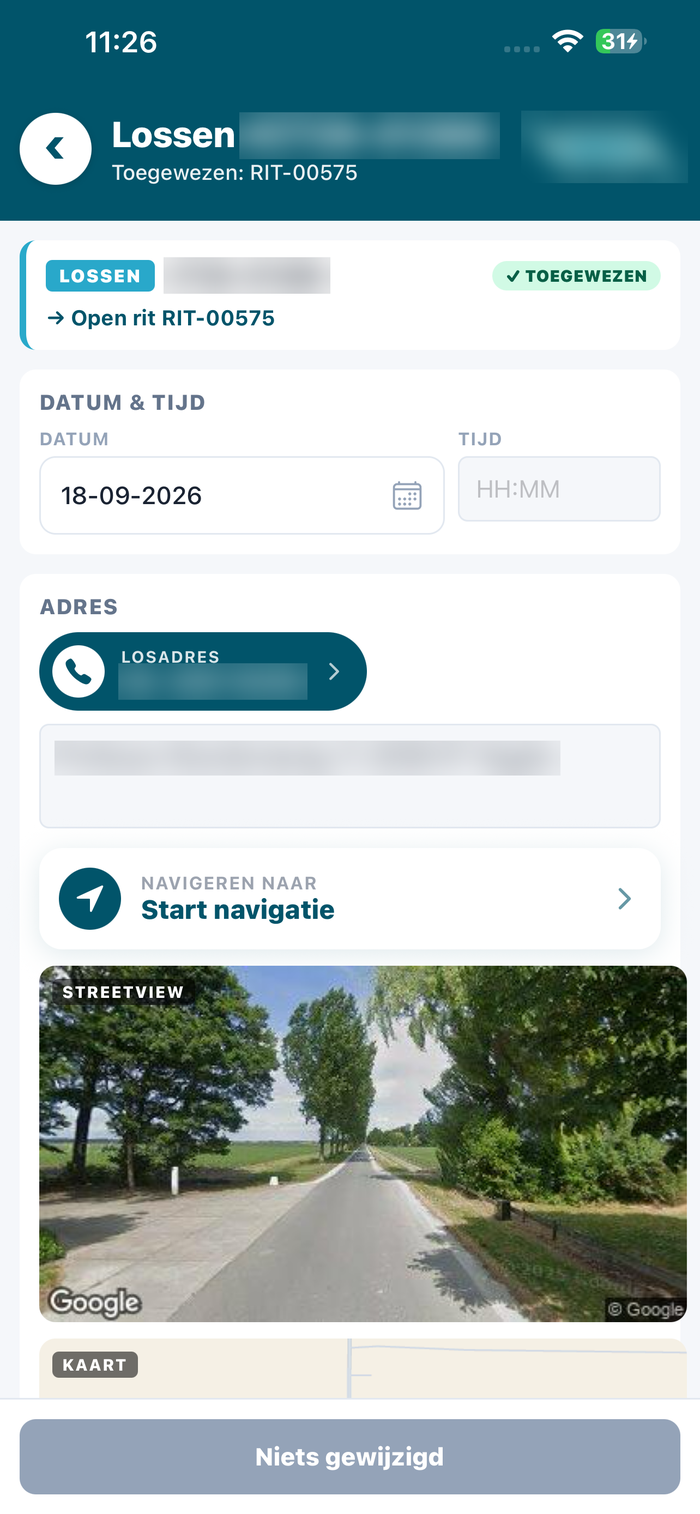
- Making changes yourself instead of passing them on: the driver no longer has to call or message the planning office. Switching tractor unit or number plate, adding notes and dragging, splitting loading or unloading to another day: he does it himself in the app and the planner sees it immediately.
- Photos with an order, kept with the order and emailed to the customer.
- Messages with the planning office, with a push notification for a new message.
- Updated live as soon as the planner changes something, and text size to his own taste.
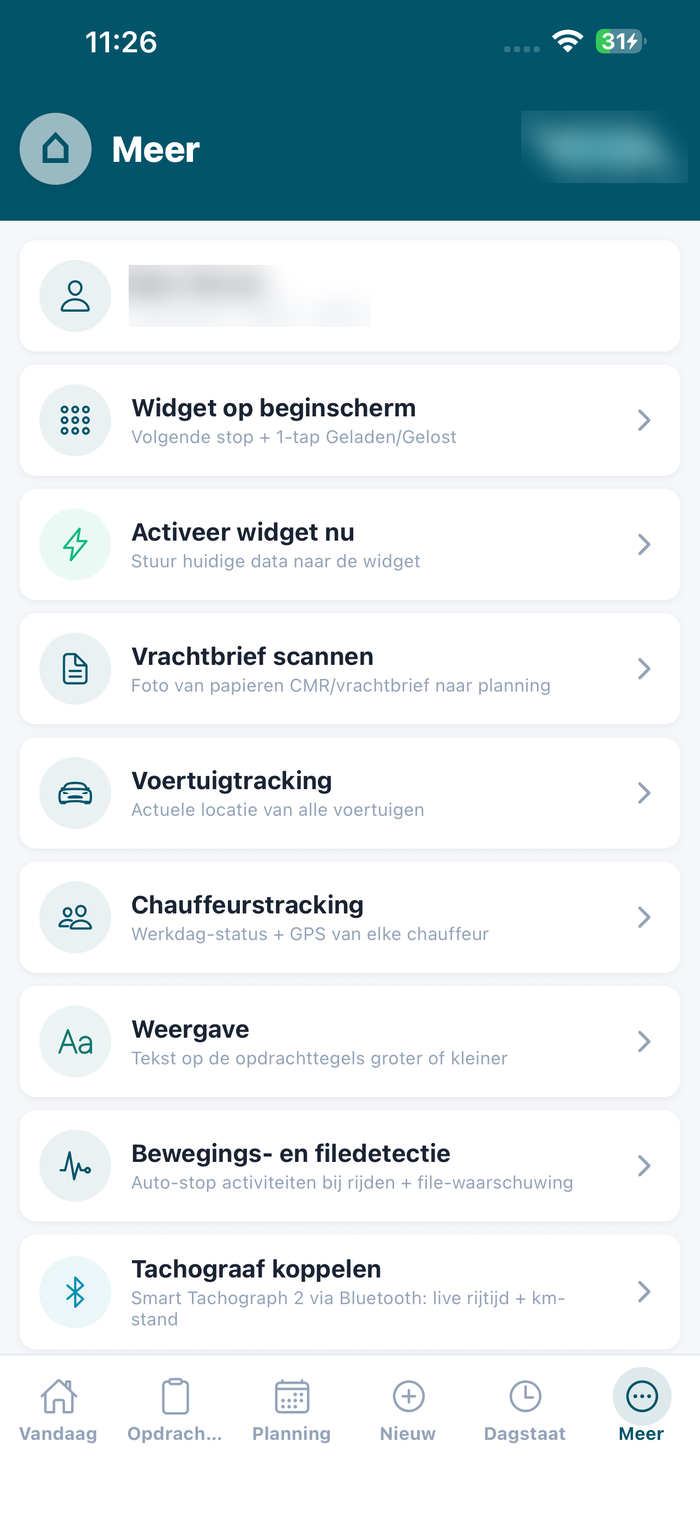
Digital consignment notes, scanned paper and emailed automatically
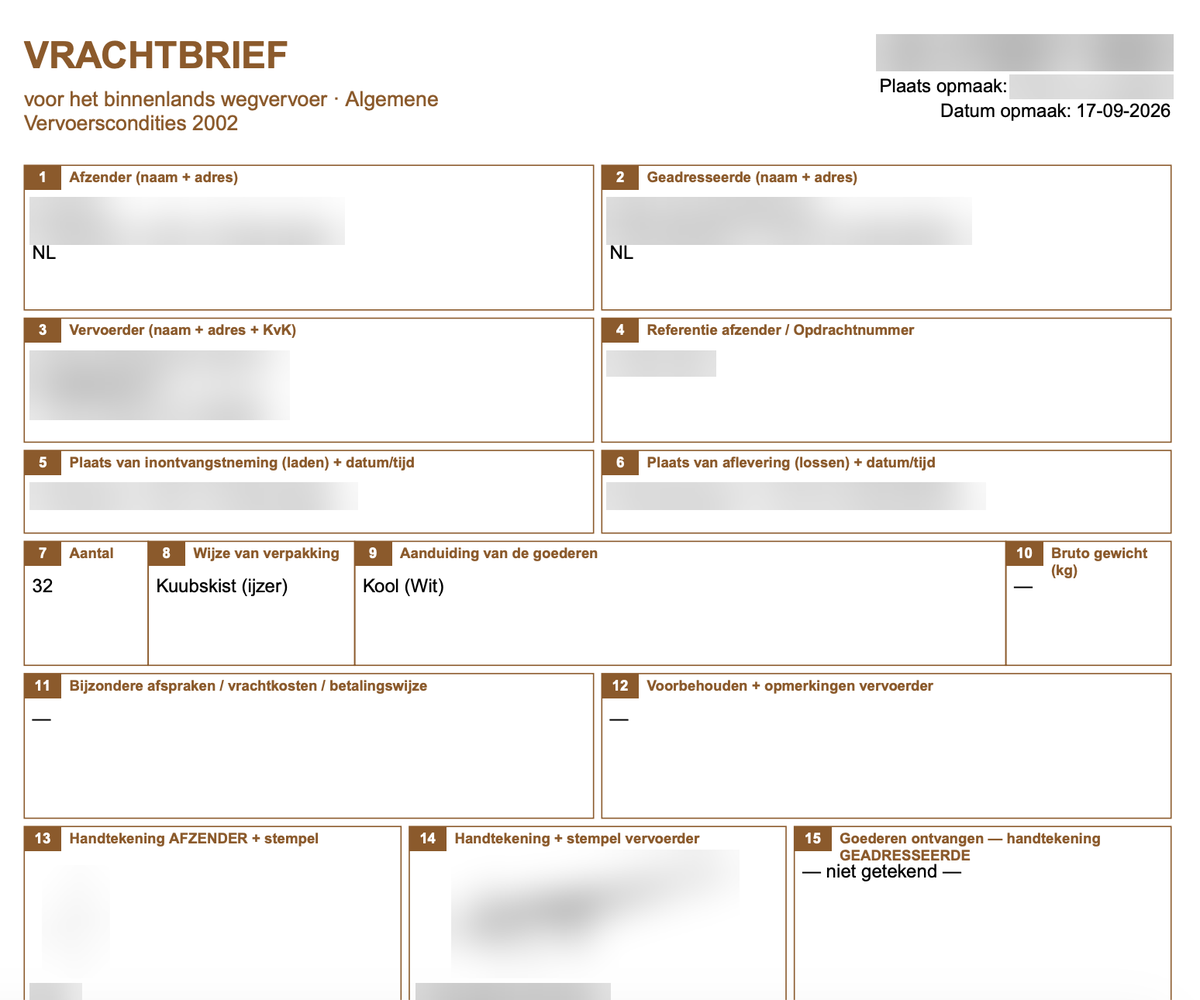
Have the sender sign on the phone when loading and the consignee when unloading, or scan the paper consignment note. The customer gets it in his mailbox by itself.
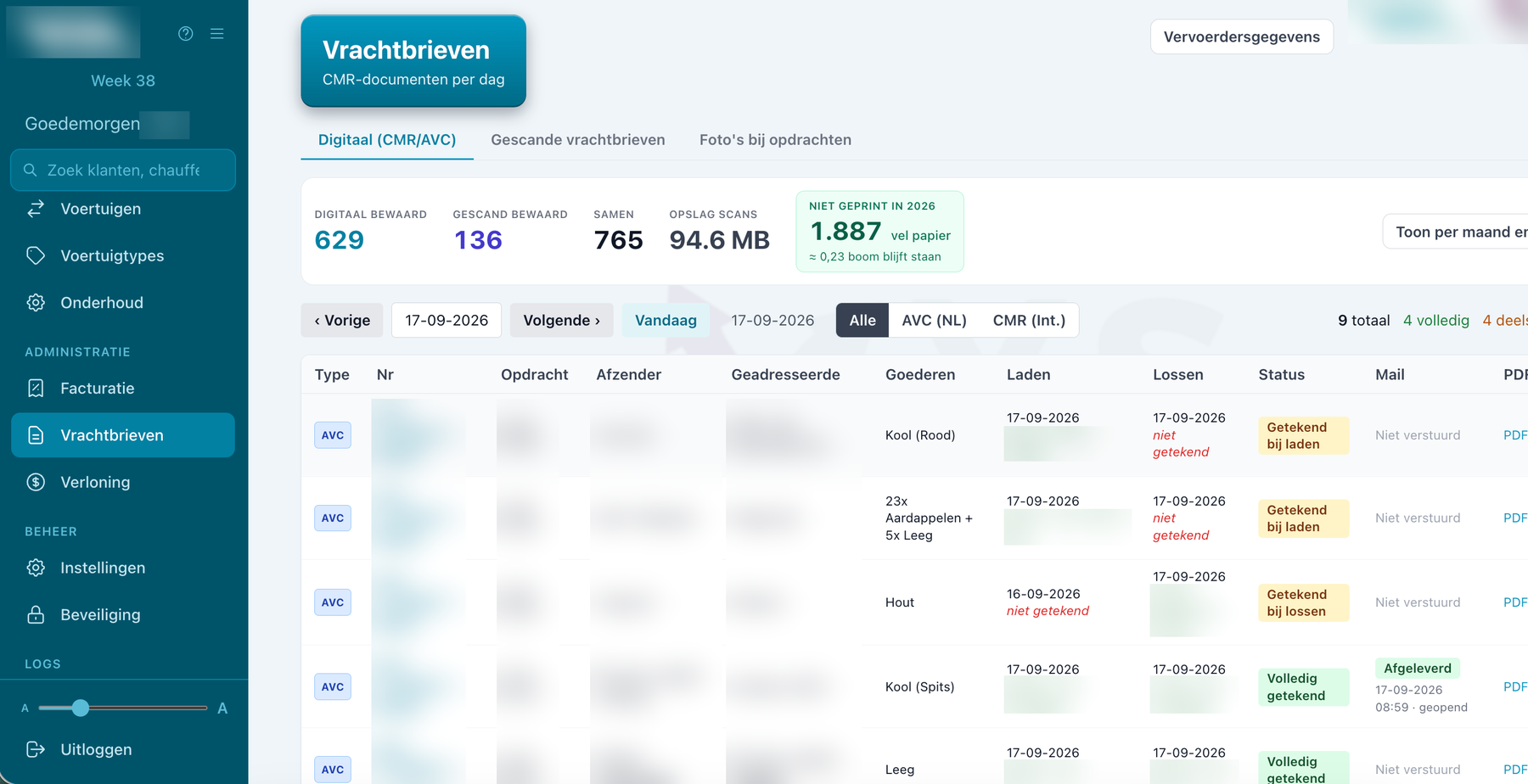
- Digital consignment note: AVC for domestic transport or CMR for international, determined and numbered automatically, as a PDF with all boxes.
- Signing on the screen with name, time and GPS. The carrier's signature is filled in automatically.
- Tamper check: the content and signature are recorded with a check code and a log, so a signed consignment note cannot be changed unnoticed.
- Scanning a paper consignment note with the phone's document scanner: edges recognised, straightened, converted to PDF and linked to the order.
- Emailing to the customer automatically, set per customer: after loading, after unloading or both.
- Mail status visible: sent, delivered, opened or not arrived.
- Archive per day with digital and scanned consignment notes and photos, and the consignment notes of the week as a zip with the invoice email.
Customers can submit their own orders
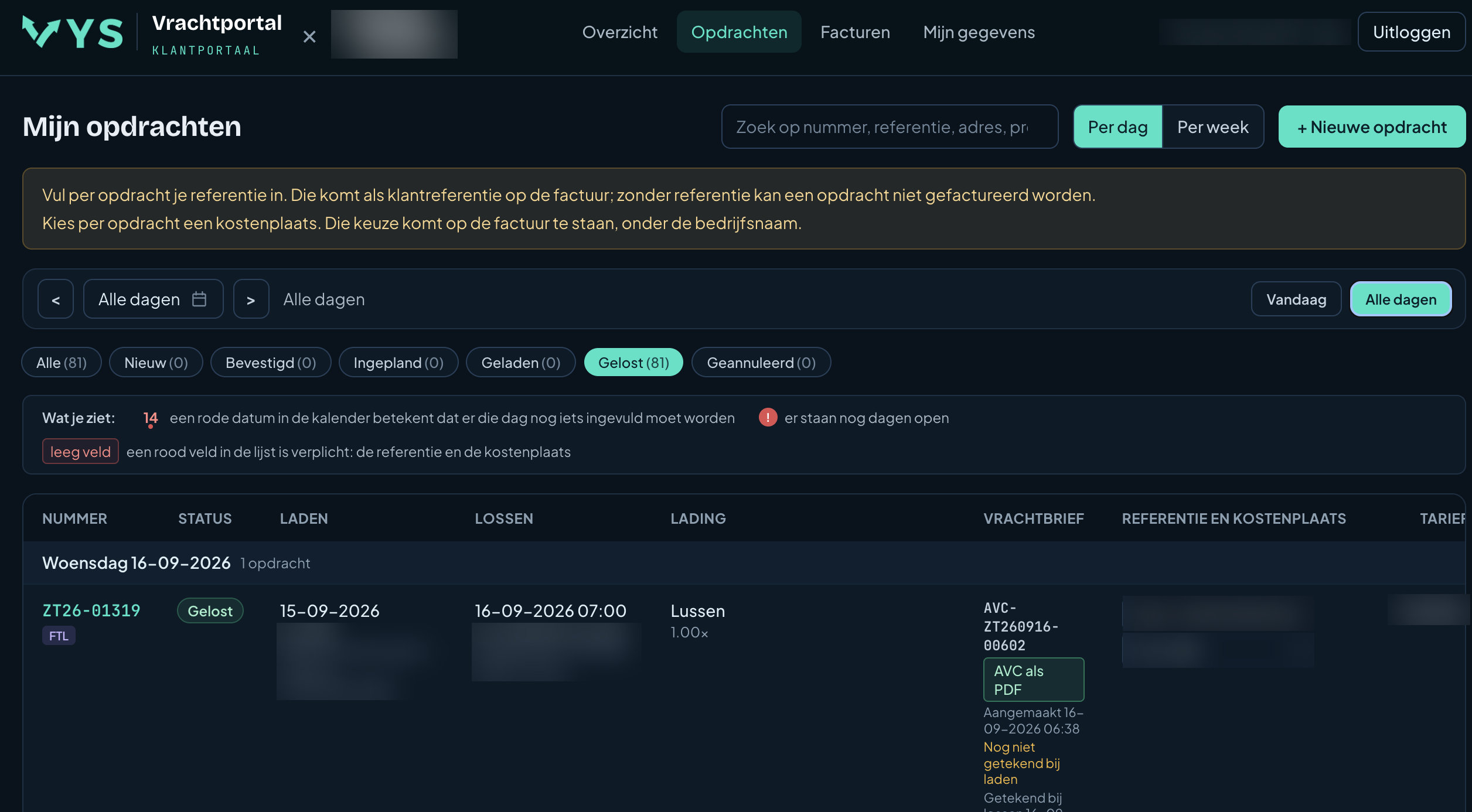
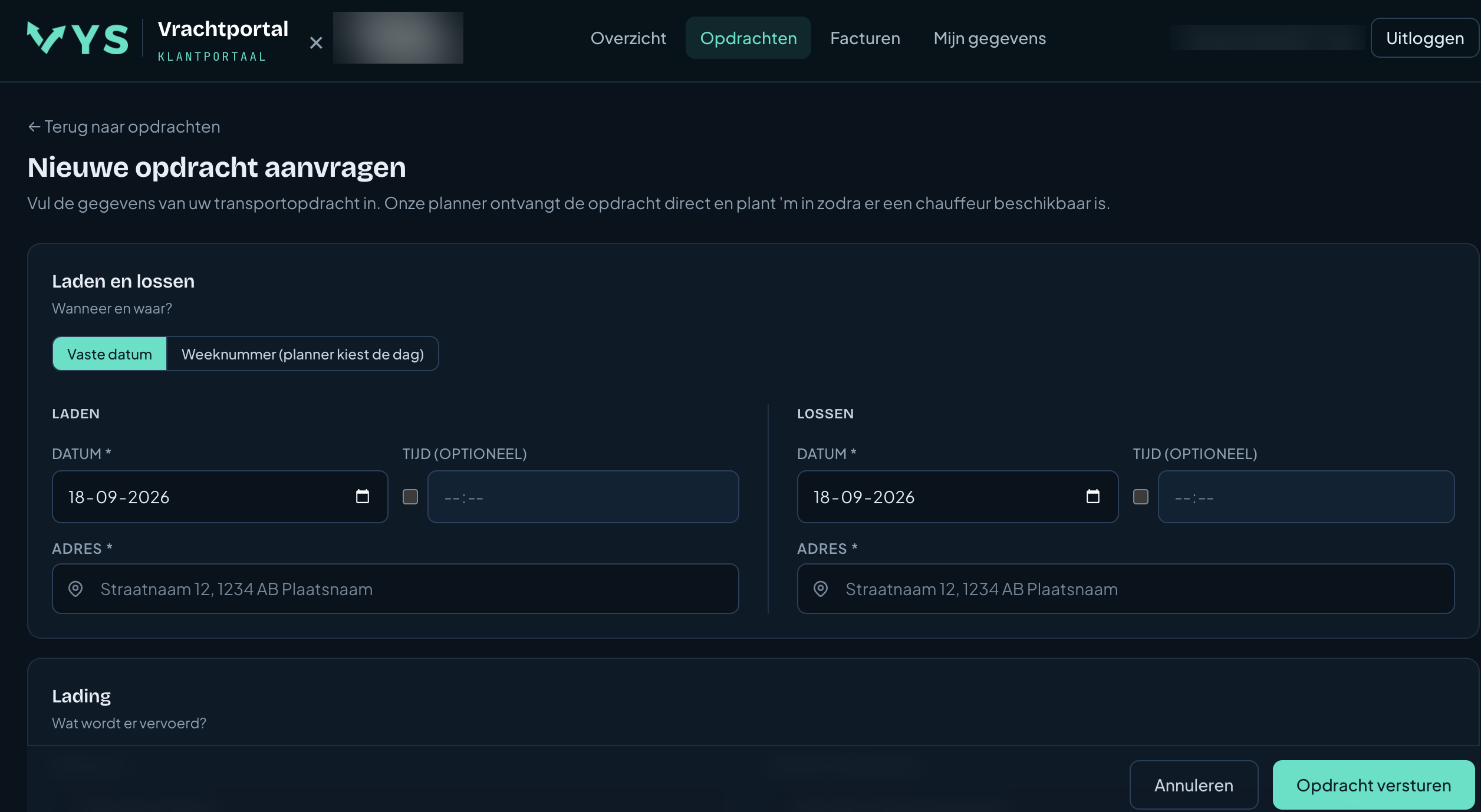
The freight portal is an option, not an obligation. You decide per customer whether he gets access, and without a portal you simply enter orders yourself. If you do offer it, customers create their own orders and submit them straight to you. No more retyping phone calls or emails: the order is in the TMS immediately, recognisable as an order from the portal and ready to be scheduled. After that they follow the status themselves and pick up consignment notes and invoices. In your house style, and without a password.
- Creating and submitting orders themselves: a fixed date and time or only a week number, loading and unloading address with suggestions, product, unit, quantity, weight, full load and reference.
- Straight into your planning: a submitted order comes into the TMS immediately, with the freight portal as its origin.
- Following the status in plain language: new, confirmed, scheduled, loaded or unloaded, with who signed when.
- Downloading consignment notes, digital and scanned, through secure links that expire.
- Invoices with status and outstanding amount, as a PDF.
- Own reference or PO number and for example a cost centre per order, which carry over to the invoice. The calendar colours days on which something is missing.
- Logging in with a one-time code by email, and access that can be switched on or off per customer.
- With your logo and name in the header. Works on the phone as well.
Invoicing on what was actually driven
Rates per customer work out every order. Per day you complete the orders and after that the system creates collective invoices per week or month, ready to email and to push through to the bookkeeping.
- Rate templates with a kilometre rate, hourly rate, diesel surcharge as a percentage or a fixed amount, and surcharges. A template per customer with its own exceptions.
- Price per order or per handling, a fixed price for a whole chain, and subcontracted work on an hourly basis. Kilometres and hours are suggested from the route.
- Daily invoicing per day with a day total, per order, for subcontracted work or chronologically per driver with arrival, departure, break and driving time.
- Actual quantity and weight from the app, with correction and a record of who changed it.
- Collective invoices per week, month or period, per customer or all at once, with VAT, reference and a separate invoice per cost centre.
- Your own invoice layout with a template editor and a live preview, a separate template per customer, and delivery by email or print.
- Following invoices: draft, sent, paid or overdue, recording payments, and monthly turnover in a chart.
- Accounting link with Björn Lundén: customers and invoices synchronised automatically, as a draft or posted directly, every night or with one click.
Full time recording, ready for payroll
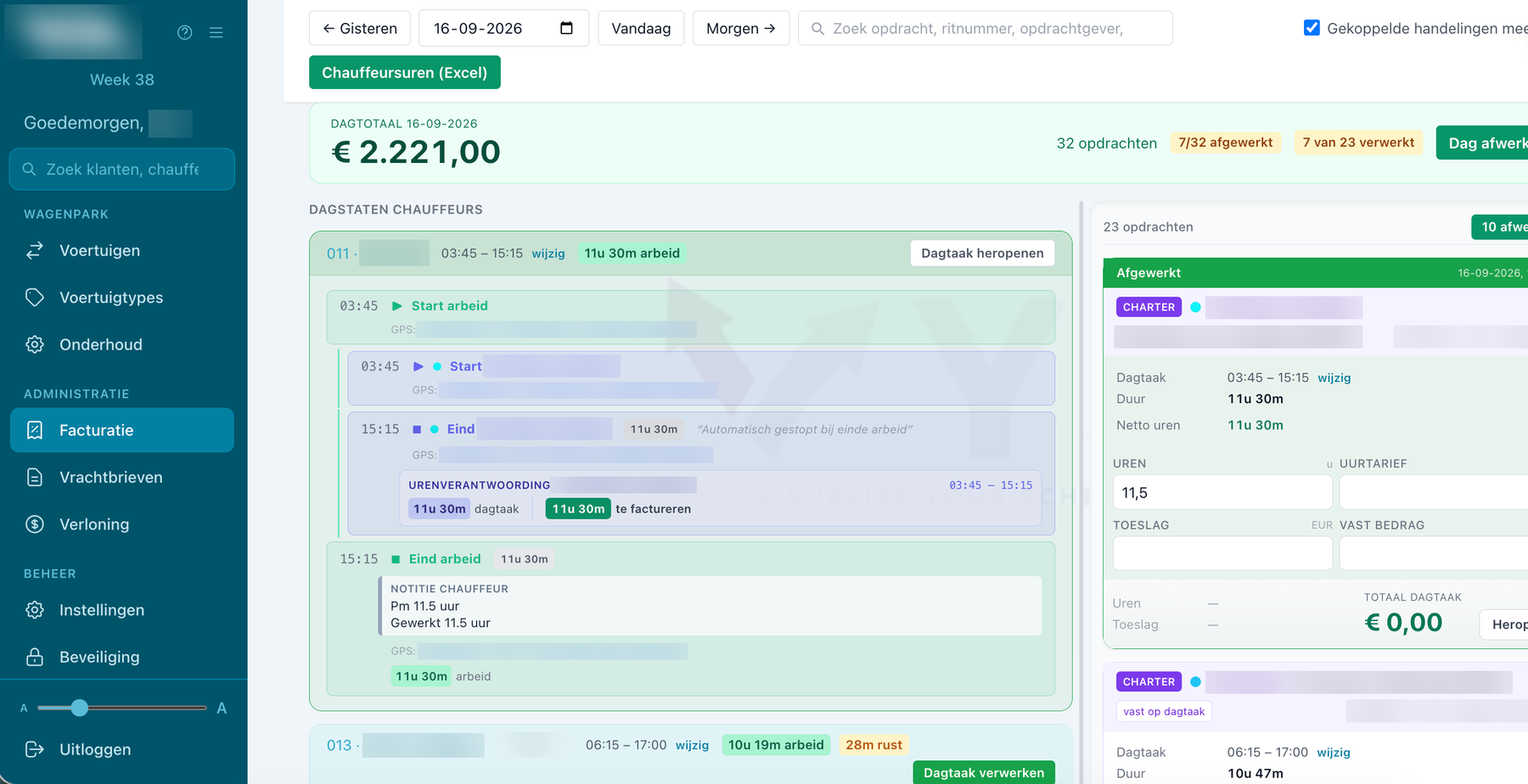
The driver keeps his day sheet in the app. The office sees the working and rest times per driver per day, can correct where needed and exports the hours with the right surcharge types.
- Start and end of work with GPS, vehicle choice and a remark, and a reminder if the working day has not been closed.
- Activities: rest, waiting, maintenance, refuelling and other, plus day tasks scheduled by the planner or started by the driver himself.
- Automatic: when the driver starts driving, the running rest or waiting time stops by itself.
- Overnight stay recorded with the location, and registered afterwards on an earlier date.
- Hours and rest times per driver per day, with totals, correction and the route driven on the map.
- Day task overview with gross, break, net and invoiced hours.
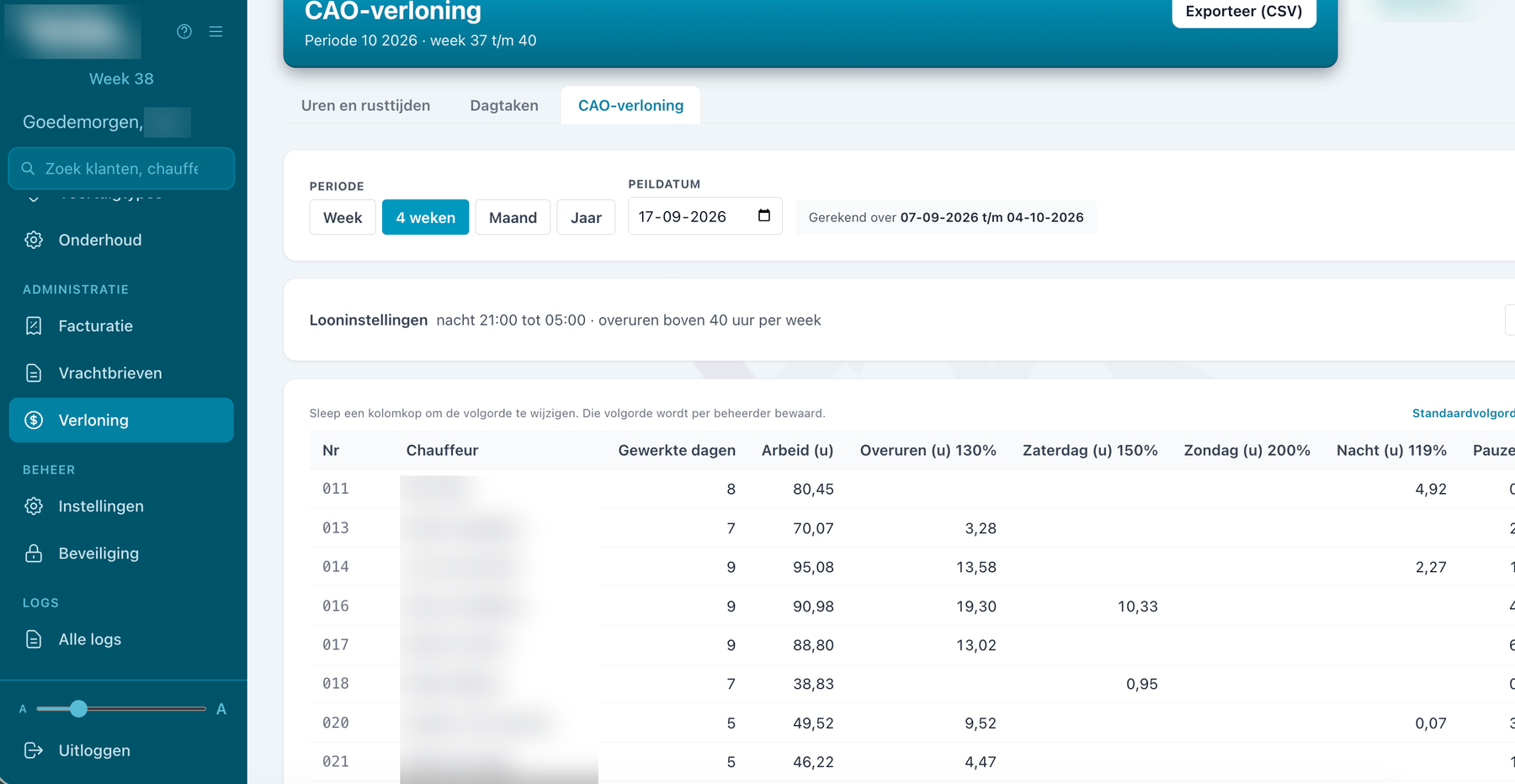
- Payroll hours under the collective agreement: hours split into overtime, Saturday, Sunday, night and break shortfall, with an adjustable night window and overtime limit. Export to Excel.
- Workshop and office staff too log their hours in the same TMS app, alongside the drivers.
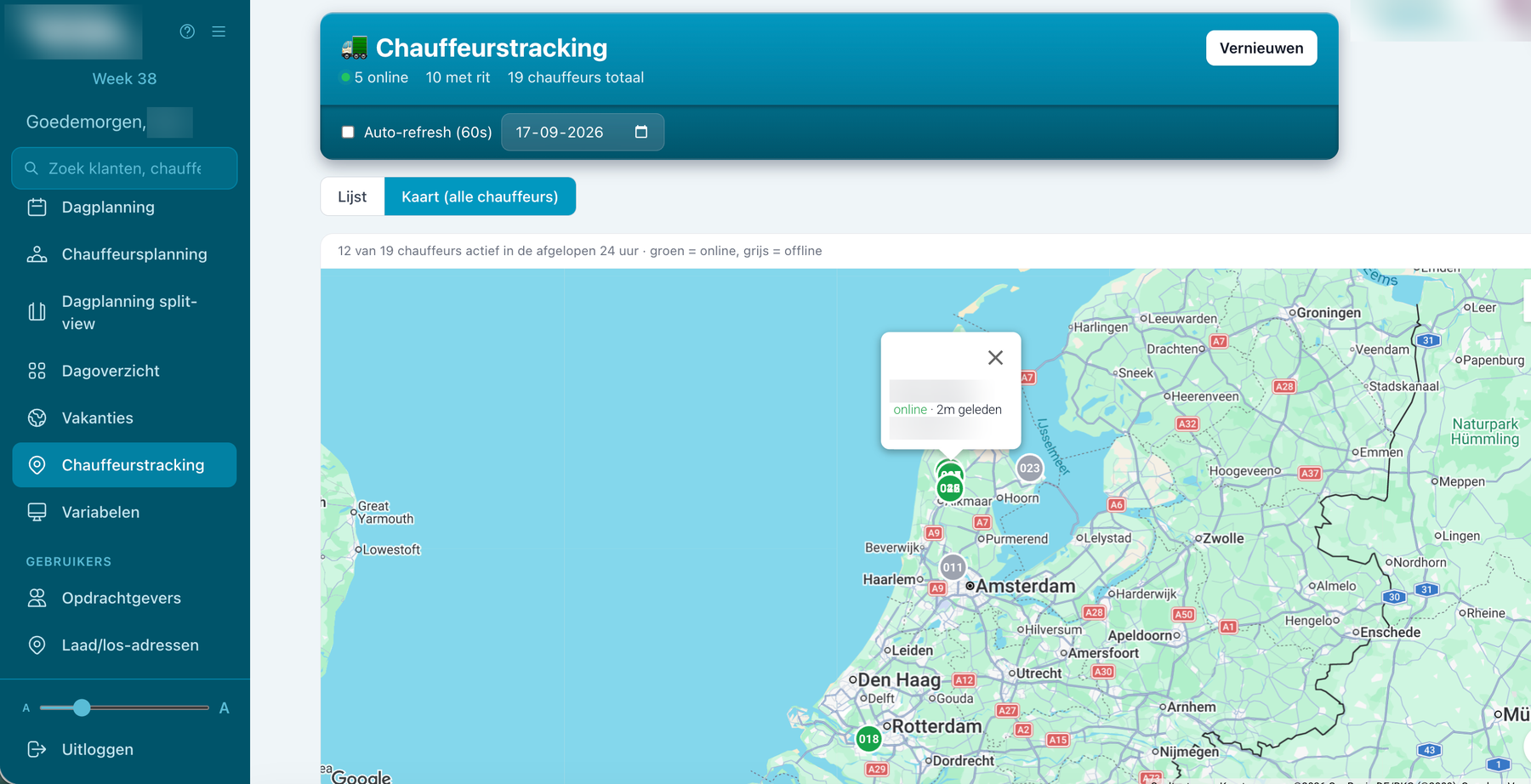
Knowing where your trucks are, and the tachograph in order
During the working day the office sees live where the drivers are. Outside working hours tracking is off. The app also connects to the tachograph for driving and rest times and downloads.
- Live map and list of all drivers with status, run, speed and the trail of the last hour, in the browser and in the app.
- Only during working time: GPS switches off on rest, end of work or without a working day.
- Connecting the tachograph by Bluetooth (VDO DTCO 4.x and Stoneridge SE5000): live activity, driving time of the week and time until the daily rest.
- DDD downloads of the driver card and the vehicle, also remotely with the company card at the office, and automatically at intervals.
- Deadlines watched: reminders for the card (28 days) and the vehicle (90 days), and an archive with a check of the digital signature.
- Operating the tachograph remotely: setting the activity and making a manual entry from the phone.
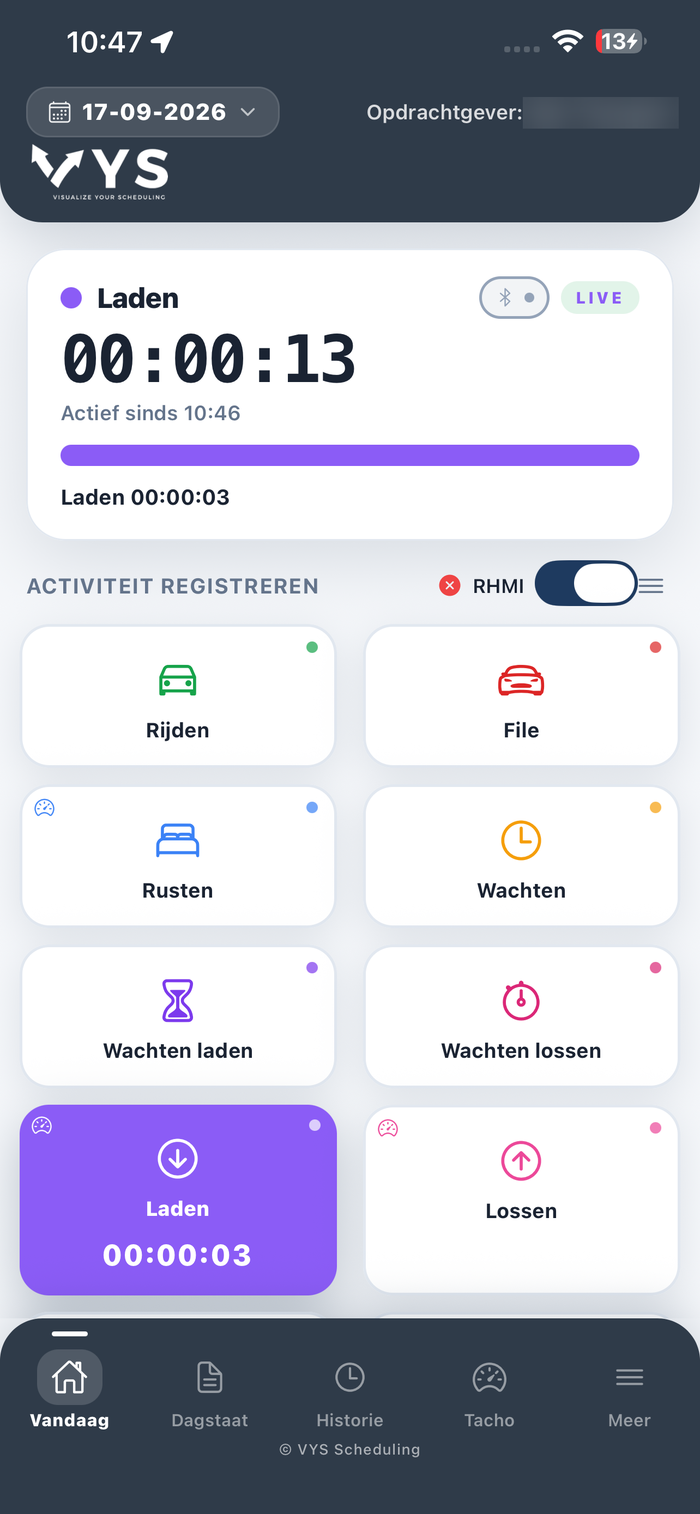
Owner-driver? Keep your time records in the TMS app
If you drive as a self-employed driver for one or more customers, you keep your hours in the same VYS TMS app. One tap per activity, and at the end of the day you send your customer a PDF with a full day report.
- Starting a shift with the customer, odometer reading and number plate. Logging in with your email address and a code.
- One tap per activity: driving, resting, loading, unloading, waiting while loading or unloading, refuelling, maintenance or a breakdown, washing, a traffic jam, an open bridge, coupling, uncoupling and swapping with the trailer's number plate, swap bodies on and off, and overnight stays.
- Your own buttons: change the order, hide buttons and create your own activities with a name, colour and icon.
- Automatic: when the truck starts moving, the app starts 'driving' by itself. When you stop you get a message, and at every change of activity the app records the address where you are.
- Nothing forgotten: time that has not been accounted for yet keeps counting visibly and you assign it afterwards. A shift that runs past midnight is split automatically.
- Day report as a PDF with your own logo, all activities, the odometer readings and the route driven on the map. Emailed to your customer with one button, or shared from your phone.
- Overview of earlier shifts, the route driven per day and all your customers.
- Optionally linked to the tachograph: when the tachograph is driving, your day sheet switches to driving as well, with the odometer reading at every change.
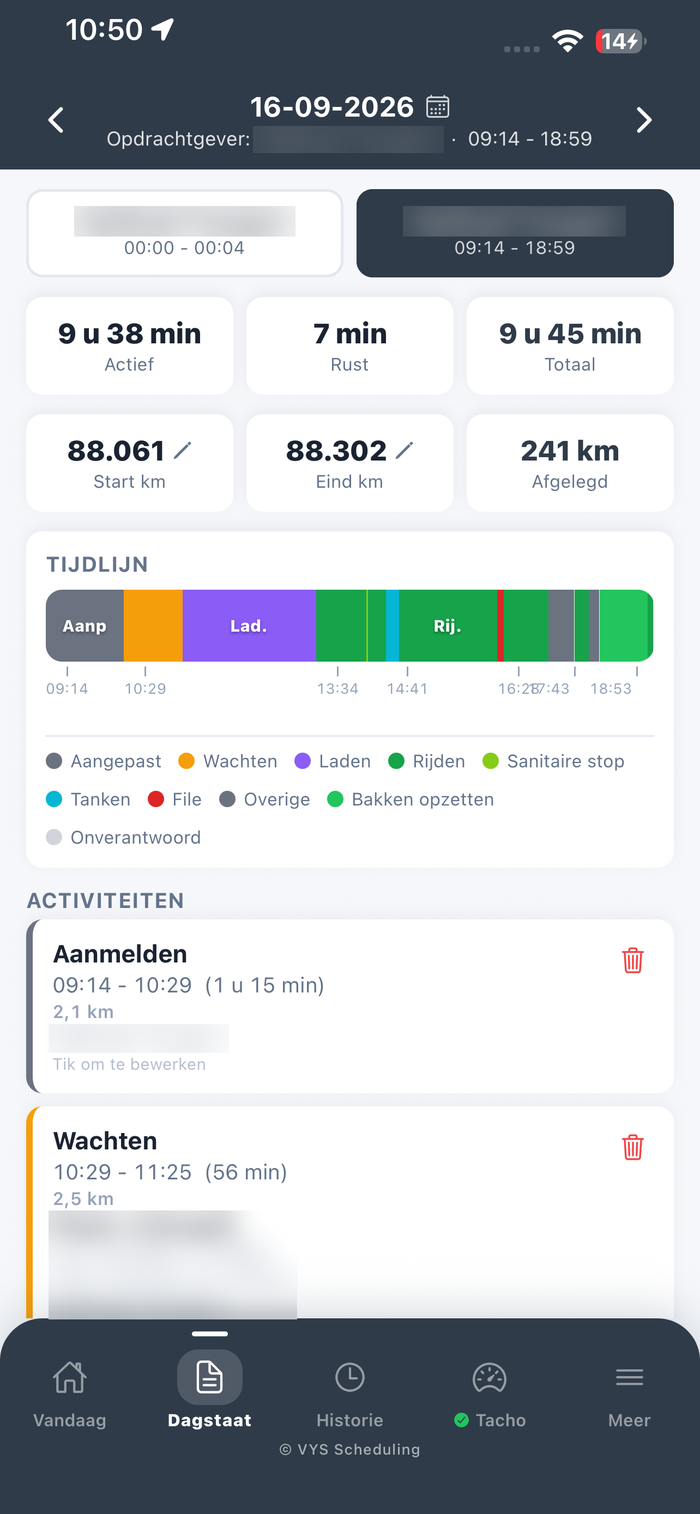
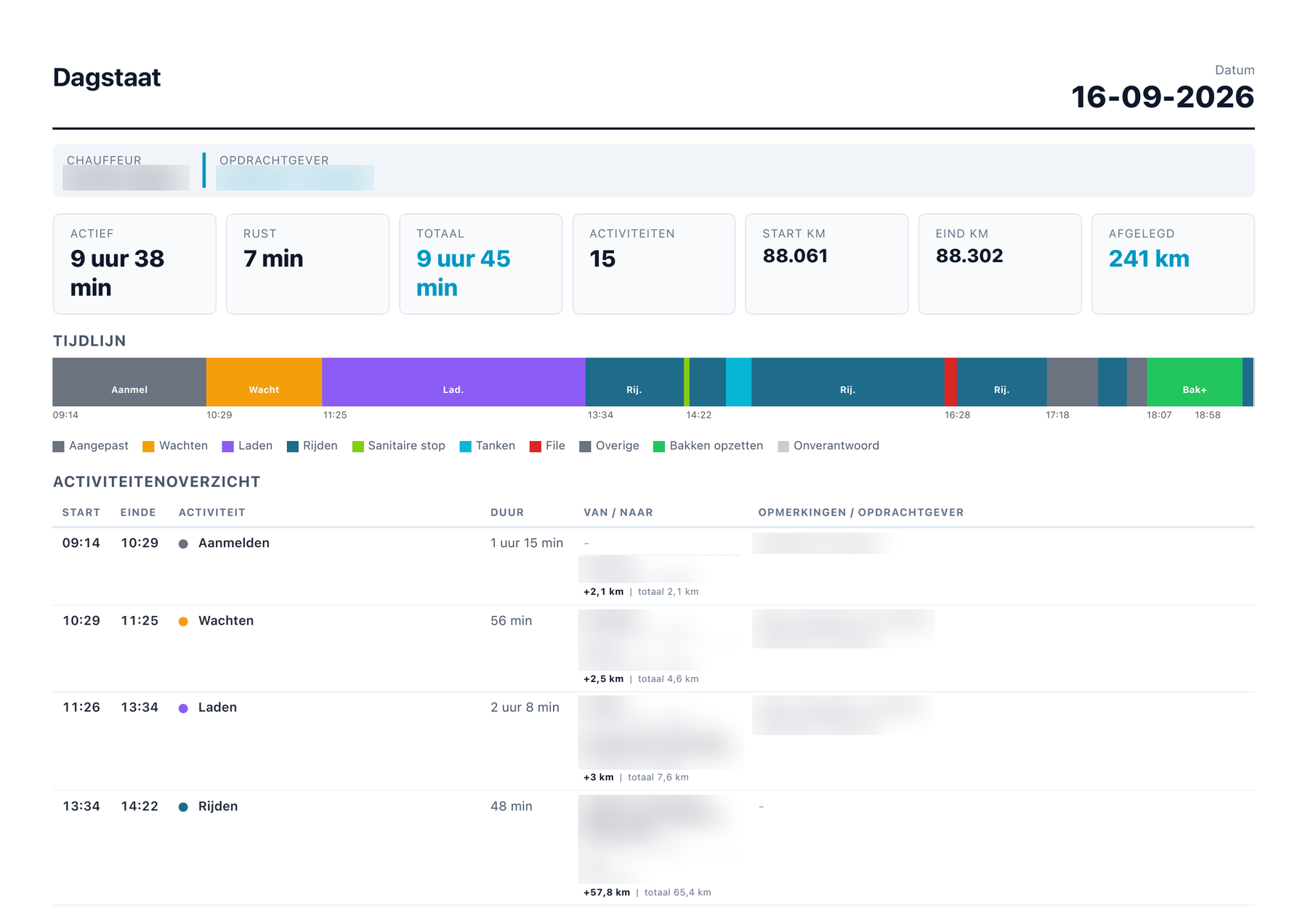
The PDF day report as the customer receives it. Names, companies and addresses have been made unrecognisable in this example.
Everything that is in VYS TMS, at a glance
No separate modules you have to buy on top: this is all in the system.
Orders
- Loading block and unloading block with their own date and time
- Week orders on a week number, as a filler run
- Several load lines: unit, product, quantity, weight
- Full truck load (FTL) and subcontracted work
- Reference, customer reference and cost centre
- Follow-up orders and linked orders on one invoice
- Copying and putting it on a second date in one go
- Filters, search and your own column layout
- Export to CSV
- Having orders recognised from email and PDF attachments with AI, for checking
- Protection against deleting orders that have been carried out or invoiced
Planning
- Planning board with a pool of unscheduled orders
- Dragging within and between runs, list or columns
- Working live with several planners
- Vehicle and driver with availability
- Subcontractors run along in the planning and the app, just like your own drivers
- Day tasks, planning tasks, overnight stays and notes
- Route optimisation, map with km and driving time
- Day overview per truck and driver planning
- Planning from the app: the only TMS where that is possible
- Logging in as a driver with one press to look along and help remotely
- Driver holiday planning with availability per day
- Vehicle maintenance planning with availability per day, and expiring inspections scheduled straight away
- Planning watchdog by email
- Run order printed or as a PDF
Planning softwarePlanning from the appPlanning subcontractors
Driver app
- Apple (iPhone) and Android, logging in with a code
- Runs, stops, load and notes
- Navigation with your own map app, Street View, day route
- Arrival registered automatically at the address
- Loaded, unloaded and waiting time with one tap
- Quantity and weight actually loaded
- Super driver: claiming and creating orders
- Making changes yourself instead of passing them on: tractor unit, notes, splitting to another day
- Photos with an order, emailed to the customer
- Messages with the planning office and push notifications
- Roles: driver, super driver and planner
- Text size and tile colours adjustable
Consignment notes
- Digital AVC and CMR as a PDF
- Signing at loading and unloading, with time and GPS
- Carrier's signature filled in automatically
- Check code and log against changes
- Signing is possible in the browser as well
- Scanning a paper consignment note to PDF
- Emailing to the customer automatically
- Mail status: delivered, opened, not arrived
- Archive per day with statistics
- Week zip with consignment notes with the invoice
Freight portal (optional)
- Customers create and submit their own orders
- Submitted orders straight into the TMS
- On a fixed date or on a week number
- Following the status in plain language
- Downloading consignment notes and invoices
- Own reference, PO number and cost centre
- Calendar showing missing details
- Managing company details and standard addresses
- Logging in without a password
- In the carrier's house style
Rates and invoicing
- Rate templates: km, hour, diesel, surcharges
- Rate per customer, per order or per handling
- Subcontracted work on an hourly basis
- Daily invoicing and chronological day overview
- Collective invoices per week, month or period
- A separate invoice per cost centre
- Template editor for the invoice
- Emailing or printing, recording payments
- Week overview and monthly turnover
- Accounting link with Björn Lundén
Time and pay
- Day sheet in the app with GPS
- Rest, waiting, refuelling, maintenance and day tasks
- Rest stopped automatically when driving starts
- Overnight stays and registering afterwards
- Work report with quick buttons on the phone
- Correcting hours and rest times per driver
- Day task overview gross, break, net
- Collective agreement pay with surcharge types
- Export to Excel
- Logging hours for workshop and office staff as well
Tracking and tachograph
- Live map of drivers and vehicles
- Tracking only during working time
- Connecting the tachograph by Bluetooth
- Live driving and rest times
- DDD download of card and vehicle, also remotely
- Automatic downloading at intervals
- Reminders at 28 and 90 days
- DDD archive with signature check
- Operating the tachograph remotely and manual entry
Management
- Customers with contact persons, chamber of commerce number, VAT and IBAN
- Importing customers from Excel or CSV
- Address book of loading and unloading addresses with instructions
- Expiry dates of driving licence, medical and driver CPC per driver, with a warning 60 days ahead
- Tractor units, semi-trailers and trailers
- Vehicle inspection dates: MOT, tachograph and inspections you name yourself such as ADR or HACCP, with filters on expiry date
- Vehicle types and home bases
- Products, units and day tasks as variables
- Administrators with roles and permissions per page
- Logging in without a password, optionally two-step
- Logs, email status and login details
- Online manual and a tour per screen
- Custom work in all kinds of areas, in consultation
Owner-drivers: time records
- Day sheet in the TMS app for self-employed drivers
- One tap per activity, your own buttons
- Driving started automatically on movement
- Assigning unaccounted time afterwards
- Odometer reading at start and end
- PDF day report with logo and route map
- Emailed to the customer with one button
- Optionally linked to the tachograph
New to a TMS? Read what a TMS is, what to look at when choosing one and why VYS TMS suits the small haulage company.
What customers say
From a small haulage company to a transport association: this is how customers work with VYS TMS and the VYS platform it runs on.
As a small haulage company where the planner and the undersigned are often on the truck ourselves, we needed a TMS that can really be driven from the app, not only from behind a desk. VYS TMS was developed further together with us and now fits exactly the way we work: drivers who can create and change orders independently, planning that moves along live, and everything from order to invoice in one system. Less calling back and forth, more overview and less need to be at the office.
Really pleasant app! Works very nicely, clear and intuitive. An ideal way to operate and read out your tachograph easily. The extensive time recording, which you can easily download as a PDF and send to customers, is extremely handy too. In short: very satisfied, and honestly I can no longer do without this app.
Vervoersvereniging Dijk en Waard has been working with this company since 2019. We recently moved from VYS 1.0 to VYS 2.0. With that, the integrated planning package received an important update; member administration, volunteer administration, driver planning, fleet management, run planning, a booking system including an app for members and drivers, and fully automated invoicing. It is logically built up, which makes it easy to use, and at the same time help is always there to answer questions. We are very happy with it!
Questions about VYS TMS
Is VYS TMS suitable for a small or a mid-sized haulage company?
That is exactly what it was made for. From the small haulage company with a handful of trucks, self-employed drivers or a planner who drives as well, to the mid-sized transport firm where several planners work live in the same planning at the same time. Everything you can plan at the office you can also plan and adjust on the road in the app.
Can I plan from the app as well?
Yes, and VYS TMS is the only TMS where that is possible. In the app you see the order pool, assign orders to a run, drag stops within and between runs, open runs and create new orders. What you change on the road is with your drivers and at the office straight away.
As a planner, can I see what my driver sees in the app?
Yes. With one press you log into the app as that driver. You then see his runs and stops exactly as he sees them, so you can help him remotely. A bar at the bottom shows that you are in driver mode, and with Back to admin you are a planner again straight away.
Can subcontractors run along in the planning too?
Yes, just as easily as your own drivers. You simply put a subcontractor on a run, and with the same VYS TMS app for Apple (iPhone) or Android he sees the runs you give him. He records loading, unloading, consignment notes and photos in the same way, so at the office and on the road you follow everything live.
Is there something for owner-drivers as well?
Yes. Self-employed drivers keep their hours in the same VYS TMS app, with one tap per activity. At the end of the day they send their customer a PDF with the full day report at the press of a button, including odometer readings and the route driven.
Which devices does it work on?
The office works in the browser, without installing anything. The driver app is there for Apple (iPhone) and Android, to download from the App Store and on Google Play. The freight portal works in any browser, on the phone as well.
How do users log in?
Without a password. Planners, drivers and customers get a one-time code by email. For drivers a fixed personal login code can be set as well, and administrators can switch on two-step verification.
Does my customer have to install anything?
No. The freight portal is optional too: you decide per customer whether he gets access, and you can always enter orders at the office or in the app. If you give a customer access, he logs in with his email address, can submit orders himself and sees his orders, consignment notes and invoices.
Can a driver book orders himself?
Yes, with the super driver role. He can link orders from the order pool to his own run, create new orders and change the order of his stops. An ordinary driver records and completes his runs.
Do drivers still have to pass changes on to the planning office?
No. If a driver switches tractor unit or number plate, wants to add a note or has to move loading or unloading to another day, he changes it himself in the app. The planning office sees the change immediately, without a phone call or a message.
Which accounting packages are supported?
For haulage there is a link with Björn Lundén, for customers and invoices. If you work with another package, get in touch: the platform also has links with Exact Online and SnelStart.
Can it be in our own house style?
The freight portal shows your own logo and name, and the driver app picks up your company's logo and colour. Custom work is possible in consultation.
Is custom work possible?
Yes, in all kinds of areas. If you work slightly differently, need a link with another system, extra details with an order or your own overview or export, we build that for you in consultation. Feel free to discuss it during the demo.
See how it works with your own runs?
We are happy to show you VYS TMS, from order to invoice, and to think along about custom work for the way you work. Email or call us and we will schedule a demo.